
Activating Apple Intelligence in macOS Sequoia Beta
1 min read
The second developer beta of macOS Sequoia is available, featuring Apple's new AI tools, although these features may not immediately launch in the EU and are unavailable in China. To try it out, back up your Mac with Time Machine or use a secondary Apple silicon device to avoid issues. You’ll need to join the Apple Developer Program, which is free, and differs slightly from signing up for public macOS betas.
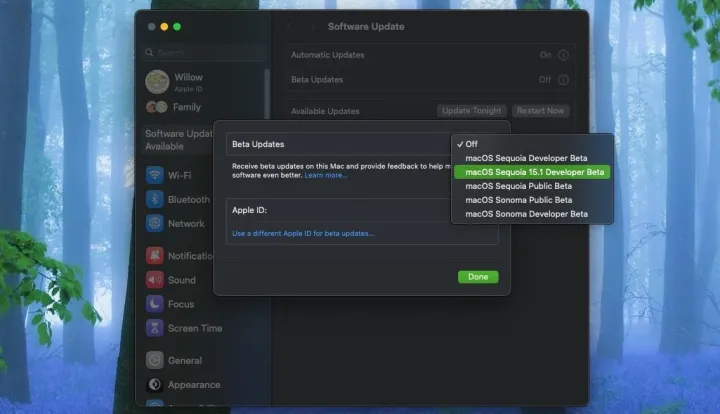
Once registered, go to the Software Update tab in System Settings, select macOS Sequoia 15.1 Developer Beta, and click "Upgrade Now." After downloading, activate Apple Intelligence by navigating to the Apple Intelligence & Siri tab in System Settings. Set Siri’s language and voice to American English, adjust your region to the United States, and set your primary language to English (US). Your Mac will restart, and you can then join the Apple Intelligence wait-list. Activation might take a few minutes to a few hours.
These AI features won’t be in the initial Sequoia release but will arrive later with a 15.1 update. Some features, like Genmoji and Image Playground, aren’t in the current beta but are expected in future updates.


