
How to Disable Personalized Search Results on Google
1 min read

Google collects user data, including search history, activity, and location, to deliver personalized search results. While this enhances user experience, it raises privacy concerns and may introduce bias. To ensure a broader and unbiased search experience, you can disable search personalization using the following methods.
1. Use the “Try Without Personalization” Link

Google provides an easy way to view non-personalized results.
Perform a search on Google.
Scroll to the bottom of the search results page.
Click on "Try without personalization."
This refreshes the page and displays search results without personalization.
2. Modify the Search URL
If you prefer non-personalized results for specific searches, modify the search URL:
Replace spaces in your query with "+" and append "&pws=0" to the search URL.
Example:
https://www.google.com/search?q=log.ng&pws=0
The "pws" parameter (Personalized Web Search) set to 0 disables personalization for that search.
3. Turn Off Search Personalization in Google Settings
Since personalized search is linked to your Google account, follow these steps:
On Desktop:
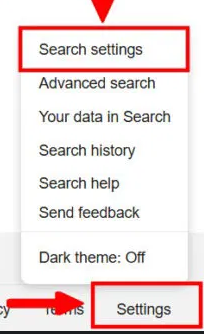
Go to Google's homepage and click Settings (bottom-right).
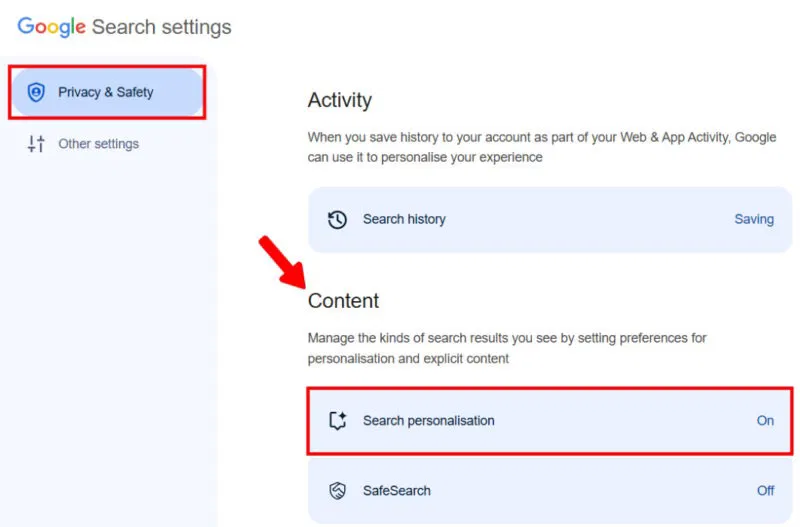
Select Search settings from the menu.
Under Privacy & Safety, locate Search personalization in the Content tab.
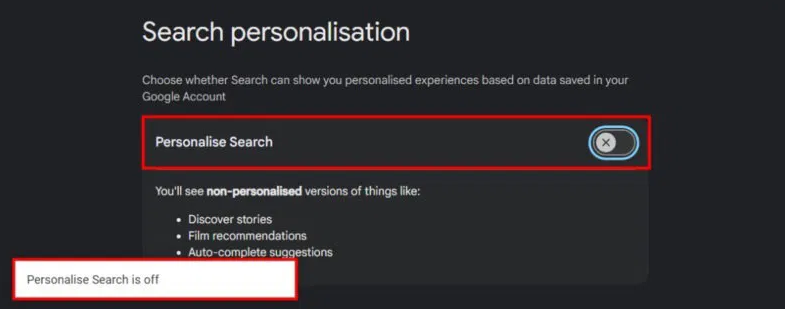
Click Personalize Search to toggle it off.
On Mobile:
Tap your Google account profile on the homepage.
Scroll down and select More settings → Search personalization.
Toggle off Personalize Search to disable personalized results.
4. Turn Off Google Web & App Activity
Since Google uses your search history for personalization, turning off Web & App Activity can limit this.
Go to Google My Activity and select Web & App Activity.
If it is enabled, click Turn off.
For a complete reset, choose Turn off and delete activity.
While personalized results can improve relevance, they may also introduce bias. Disabling or limiting personalization ensures a more neutral search experience.