Wuthering Waves Steam Launcher Change: What Version 3.8 Means for PC Players
5 min read
A major change to the Steam installation process
Kuro Games is changing how Wuthering Waves installs and updates through Steam. The developer first previewed the transition in an official September 29 Steam announcement, saying the game's existing download method would be replaced with its own launcher during Version 3.8. A November 5 report, citing a newer Kuro Games notice, says Steam players will need to remove the existing local game installation and install the new launcher through Steam as part of that transition. The distinction between an announcement and the actual maintenance window matters: players should wait for the instructions and timing shown in the official Steam announcement or game client before changing files. This is a change to the PC installation process, not a claim that the game is leaving Steam.
Why Kuro Games wants a separate launcher
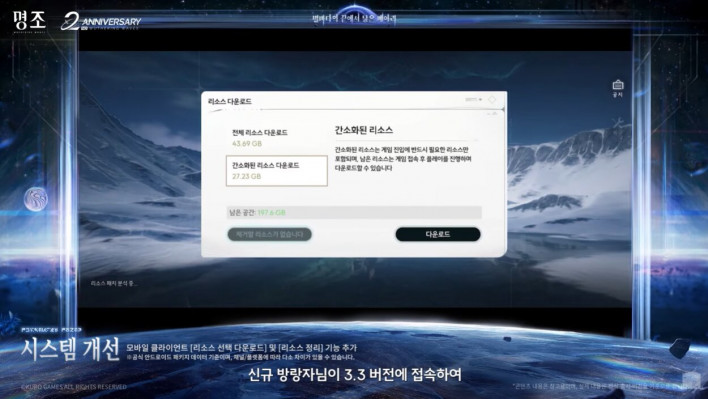
Steam ordinarily handles downloads and updates for games distributed through its platform. Kuro Games says its own launcher will support more flexible resource downloads and future pre-downloads. For a continually updated open-world game, each new version can involve large amounts of content, and not every player needs the same level of visual assets. The developer's plan is to let players choose resource packages that suit their device. The Steam listing remains the entry point, but the official launcher becomes responsible for managing game files. This means the visible experience of installing or updating Wuthering Waves may differ from what players are used to in other Steam titles.
The Version 3.8 transition
Kuro's official preview identified Version 3.8 as the point at which the launcher would change, while saying detailed rollout instructions would follow. The November 5 report describes a reinstall process during Version 3.8 maintenance: uninstall the previous game package, download the new launcher from Steam, then choose the resource package in the launcher. It is important not to treat the report as a reason to uninstall immediately without checking the official notice. Maintenance dates, client availability and download prompts are the details that determine when the procedure actually applies. The best source for those details is the game's official Steam announcements rather than an unrelated download link or third-party installer.
Different resource tiers for different PCs
The most interesting new feature is tiered resource downloading. Kuro Games has described a system that allows players to select resources according to their preferred graphics quality. A November report names UHD, HD and SD tiers. In principle, a lower tier could reduce the amount of storage and data needed on a modest PC, while a higher tier would preserve assets intended for more demanding visual settings. Those labels do not by themselves guarantee a particular performance improvement, and the exact storage requirement depends on the version and package. Players should compare the official package descriptions with their device's available space and preferred graphics settings instead of assuming the smallest download is always the best choice.
Pre-downloads are another part of the plan
The official September announcement also promised pre-download support after the new launcher becomes available. Pre-downloading allows players to fetch resources for an upcoming update before that update becomes playable, potentially reducing the wait during release day. That is particularly useful for players with slower connections or limited time to download a large update. Kuro said detailed timing would be announced later; the November 5 report connects the feature to the pre-download window for Version 4.0. Until the developer posts a schedule, that should be understood as a rollout plan rather than a promise that every player can immediately start pre-downloading future content. The feature concerns update files, not early access to unreleased gameplay.
What happens to account progress?
A reinstall understandably raises concerns about saved progress. The November report says Kuro's instructions distinguish local installation files from account data, and that the reinstall should not erase account progression. That is consistent with the account-based structure of an online game, but players should still verify that they are using the correct account and login method when the new launcher appears. Reinstalling a client is not the same as deleting an account. It is also sensible to confirm the official instructions before making changes to any custom local settings. Players should not download unofficial replacement launchers offered through comments, messages or unfamiliar websites.
Why this matters for storage-conscious players
A major advantage of the proposed system is choice. Wuthering Waves has a visually elaborate world, and a one-size-fits-all resource package can be inefficient for someone playing at lower settings. Tiered downloads may allow that person to avoid downloading assets they do not plan to use. Conversely, players with more capable hardware can choose a larger package if they value the corresponding visual presentation. Kuro has not established that these tiers will automatically improve frame rates across all hardware. Graphics performance depends on more than installed asset size. The clearer benefit is that users should have more control over how much game data is stored and downloaded.
What Steam users should watch for
The next practical checkpoint is an official maintenance announcement that specifies the Version 3.8 window and provides the exact launcher transition steps. Users should read the Steam notice carefully, allow enough free space for the new installation and check the launcher’s available resource options. If the game does not launch after the change, the developer's official support and in-game feedback channels are more reliable than improvised fixes circulating online. The November report mentions potential file conflicts when the old installation remains, which is why it describes a clean reinstall. That instruction should be followed only when confirmed by the current official update notice.
The difference between a new game update and a new download system
Version numbers can make this sound like a content announcement, but the specific story here is the distribution technology. The launcher affects how resources reach players and how updates are handled. It does not, by itself, confirm new characters, maps or story chapters. Keeping those subjects separate prevents confusion: Kuro can announce new gameplay content independently from the mechanics of installing it. For returning players, the main question is whether the next Steam update will look different. For new players, the key question is which resource tier the launcher recommends for their system. Both groups should be able to keep using the official Steam entry point.
Sources and status
Kuro Games' official Steam announcement, “[Preview] Upcoming Client Update & Launcher Replacement on Steam,” published September 29, 2026: https://steamcommunity.com/app/3513350/announcements/ . Kuro's official resource-download information: https://wutheringwaves.kurogames.com/en/main/news/detail/5513 . November 5 reporting about the reinstall requirement: https://patchbeat.net/news/wuthering-waves-steam-official-launcher-version-3-8-reinstall/ . The official preview confirms the launcher plan; users should verify the latest instructions in Steam before reinstalling.