Xbox PC App Redesign Promises Faster Launches, Better Library and Cloud Navigation
5 min read
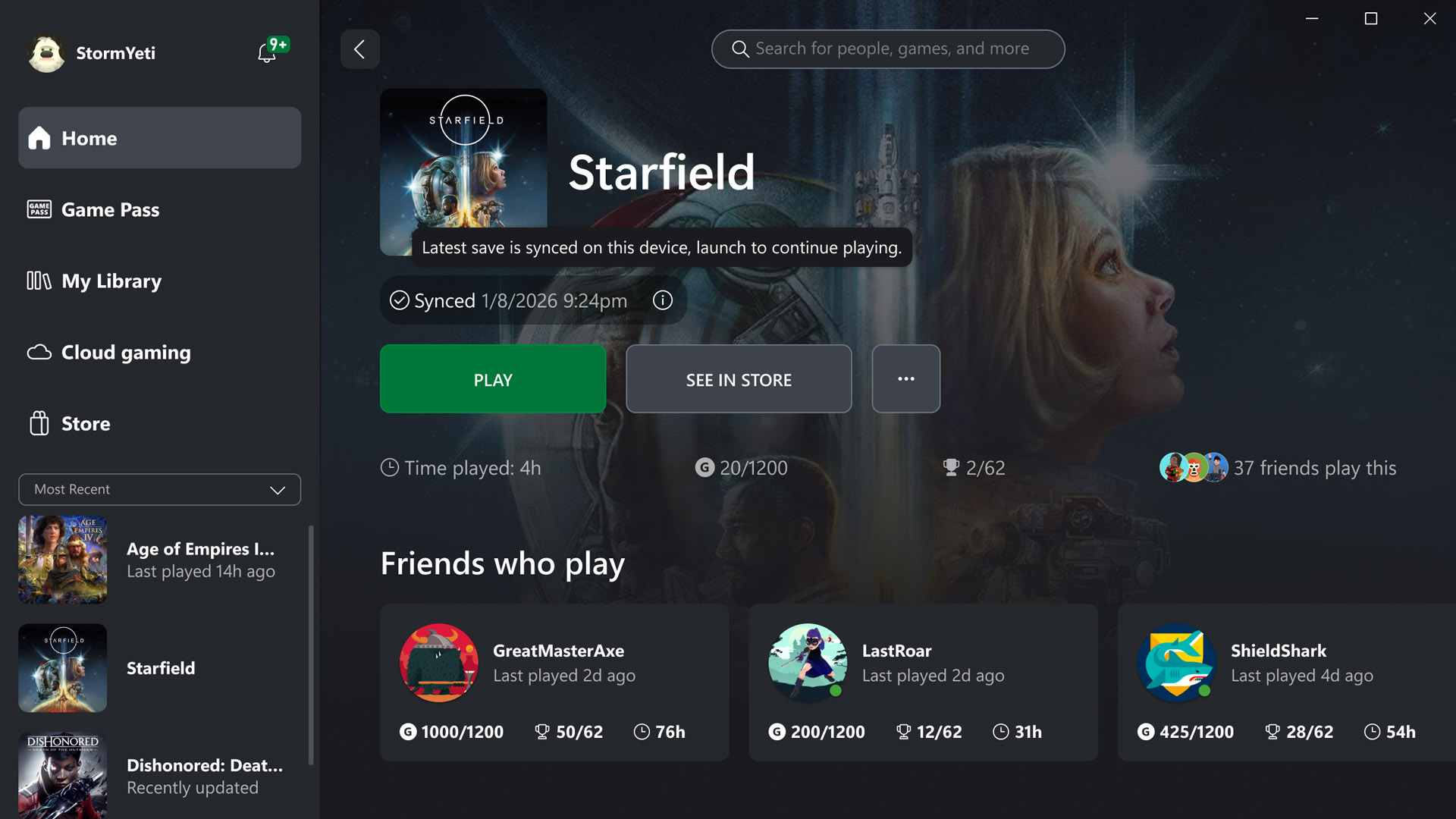
Microsoft starts testing a redesigned Xbox PC app
Microsoft announced a substantial update to the Xbox experience on November 5, 2026. The most immediate change is a redesigned Xbox PC app that Xbox Insiders can begin testing now. The company says the app opens faster, displays important pages more quickly and makes it easier to find games and friends. It is also extending a refreshed web experience and updating Xbox cloud gaming interfaces on supported televisions and VR headsets. The announcement is about navigation and performance rather than a new subscription tier or an exclusive game. For PC players who open the Xbox app regularly, small reductions in waiting time could be more noticeable than a dramatic visual redesign.
What the performance numbers actually mean
Xbox says its internal testing found that the updated PC app launches up to 60 percent faster. Home, Store and Game Pass pages reportedly load up to 50 percent faster, while windows inside the app open up to 65 percent faster. Those are company-provided test results, not independent benchmarks on every Windows PC. Microsoft explicitly warns that results vary with the device, internet connection, configuration and usage. A machine with fast storage and a clean installation may show a different improvement from an older laptop running several background programs. The useful takeaway is that Microsoft is treating responsiveness as a measurable part of the redesign. Players should test their own experience rather than expect exactly the advertised percentage.
A library that is easier to navigate
The updated library introduces simpler navigation, new filters and additional ways to organise a game collection. That addresses a common problem for people whose games come from different sources: the interface needs to show what is installed, what is owned and what is available through a subscription without requiring several separate searches. Microsoft has not claimed that the redesign merges every PC storefront into one universal library. The changes are to the Xbox experience itself. Better filtering should make it easier to revisit a game you already have, compare available options and spend less time browsing through unrelated items. The precise arrangement may continue to change as Insider feedback arrives.
Friends and social tools move closer to the centre
Microsoft is placing friends and social features directly in the main navigation. The intention is to make it easier to see what friends are playing, open a chat or join a party. This matters for multiplayer users because the game-launching experience often begins with finding the right person rather than finding the right title. Previously, a social tool hidden in a secondary window could interrupt that flow. The redesigned layout aims to make communication feel like part of the main app. It does not automatically mean every game supports cross-play or that friends on every platform can join the same session. Those restrictions remain dependent on the game and the services involved.
Search is becoming more comprehensive
Xbox says the revised search tool covers a broader set of results, including games, installed titles, add-ons and people. That is a useful distinction. Someone looking for an expansion should not need to search the store and then repeat the search in a separate installed-games list. Someone trying to find a friend should be able to use a familiar search entry point. Microsoft has also refreshed game cards, Home, Settings and animations to make the interface easier to scan. Whether the new arrangement is actually more convenient will depend on individual habits, and the Insider period gives Microsoft a chance to adjust elements that confuse users.
The web version is expanding beyond Insiders
Microsoft's refreshed Xbox web experience was previously available as an Insider preview. The company now says it will roll out to more players automatically over the following weeks. Players who want to try it earlier can visit the official cloud gaming site at play.xbox.com, subject to availability and account requirements. The new web library brings together games playable through the cloud, whether a player owns an eligible game or accesses it through Game Pass. Users can sort and filter by recent activity, genre and input options. That does not mean every purchased Xbox game is automatically streamable; the cloud library reflects the titles a player is eligible to access.
Desktop mode and accessibility choices
The web interface adds a desktop mode designed to use more space on larger displays. Microsoft is also offering light and dark themes alongside five high-contrast options. These are practical interface choices rather than headline gaming features, but they can improve day-to-day use. Someone playing on a large monitor may want to see more titles without scrolling, while someone with a visual accessibility preference may benefit from clearer contrast. Microsoft says the refreshed visual language will also appear on supported televisions and VR headsets. It is not promising that every screen will use an identical layout; the aim is a recognisable experience adapted to different devices.
How to try the changes
The updated PC app is rolling out first through the Xbox Insider programme. Microsoft directs interested Windows users to the Xbox Insider Hub and points existing Insiders to official support and feedback channels. Because this is a preview, some interface elements may change before wider availability. Users who rely on the app for regular play should be aware that preview software can have rough edges. Joining the programme is optional; the announcement does not say that every Windows user has received the redesign immediately. The cloud web refresh, meanwhile, is planned to expand automatically over the following weeks.
What this update does not change
It is easy to confuse a faster Xbox app with faster game downloads or improved game frame rates. The November announcement does not promise either of those outcomes. App launch times and page responsiveness are separate from the speed of a large game download, which depends on servers, storage and the user's connection. Similarly, a cleaner library does not alter a game's graphics settings or the hardware requirements of a demanding release. LOG.ng has previously covered Xbox app download-speed improvements; this is a different story about interface performance and navigation. Keeping the two updates separate helps readers understand what they can realistically expect.
A practical update rather than a platform reset
The redesign shows Microsoft trying to reduce friction across the places where people already use Xbox services. PC players get quicker navigation and more visible social tools. Cloud users get a more useful library and a layout designed for larger screens. Supported TV and VR apps begin moving toward the same overall look. The company still needs to demonstrate that the gains hold up outside its test environment, but the changes are concrete enough for Insiders to evaluate now. The most sensible test is not whether the app looks different in a screenshot; it is whether a player can launch a game, find friends and return to their library with fewer interruptions.
Sources
Microsoft's November 5, 2026 Xbox Wire announcement: https://news.xbox.com/en-us/2026/11/05/a-faster-simpler-xbox-experience-is-coming-to-pc-web-and-cloud/ . The performance figures are Microsoft's internal measurements and are not guaranteed across all devices.